
WordPress is one of the most popular platforms for creating and managing websites. If you want to learn WordPress for beginners, you can start by understanding its basic features, such as themes, plugins, pages, and posts. You do not need advanced coding skills to get started with WordPress. In this guide, we will explain how to learn WordPress step by step and how you can practice by building your own website.
What Is WordPress?
WordPress is a content management system (CMS) that allows you to create and manage websites without needing advanced coding skills. It provides an easy-to-use dashboard where you can add pages, write blog posts, upload images, and manage your website content.
WordPress also offers themes and plugins that help you customize your website and add new features. Themes control the appearance and design of your website, while plugins add extra functionality. Because of its flexibility and ease of use, WordPress is a popular choice for beginners, bloggers, businesses, and many other types of websites.
Why Should You Learn WordPress?
Learning WordPress can be useful for anyone who wants to create and manage websites. It is beginner-friendly and allows you to build different types of websites without needing advanced programming skills. You can use WordPress to create blogs, business websites, portfolios, online stores, and more.
Another benefit of learning WordPress is that it offers thousands of themes and plugins. Themes help you design your website, while plugins allow you to add useful features. With regular practice, you can learn how to create professional websites and improve your skills over time.
How to Start Learning WordPress
If you are a beginner, the best way to learn WordPress is to understand the basics and practice by creating a real website. Start with the WordPress dashboard and gradually learn about themes, plugins, page builders, and other important features.
Learn the WordPress Dashboard
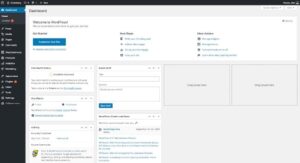
The WordPress dashboard is the main control area of your website. From the dashboard, you can create pages, write blog posts, upload images, install plugins, change themes, and manage different website settings. Understanding the dashboard is one of the first steps to learning WordPress.
Understand Themes
A WordPress theme controls the overall appearance and design of your website. It can affect the layout, fonts, colors, header, footer, and other visual elements. Beginners can start with a simple theme such as Astra and customize it according to their needs.

Learn Plugins
Plugins add extra features and functionality to a WordPress website. For example, you can use plugins for SEO, contact forms, security, backups, and many other purposes. Learning how to install, configure, and manage plugins is an important WordPress skill.
Learn Elementor
Elementor is a visual page builder that allows you to design WordPress pages using a drag-and-drop interface. Instead of writing all the code manually, you can add headings, images, buttons, containers, and other elements visually. Learning Elementor can make it easier for beginners to create attractive website layouts.
Practice by Building a Website
The best way to improve your WordPress skills is through practice. Create a small practice website and try building different pages such as Home, About, Services, Blog, and Contact. You can also practice writing blog posts, installing plugins, customizing the theme, and optimizing your content for SEO.
How Long Does It Take to Learn WordPress?
The time needed to learn WordPress depends on your learning speed, practice, and the skills you want to develop. A beginner can learn the basic WordPress dashboard, pages, posts, themes, and plugins within a few weeks with regular practice.
If you want to create professional websites, you may need more time to learn Elementor, website customization, SEO, and other advanced features. The best way to improve your WordPress skills is to practice regularly and build real websites instead of only watching tutorials.